How GitHub Copilot Customisation Actually Fits Together
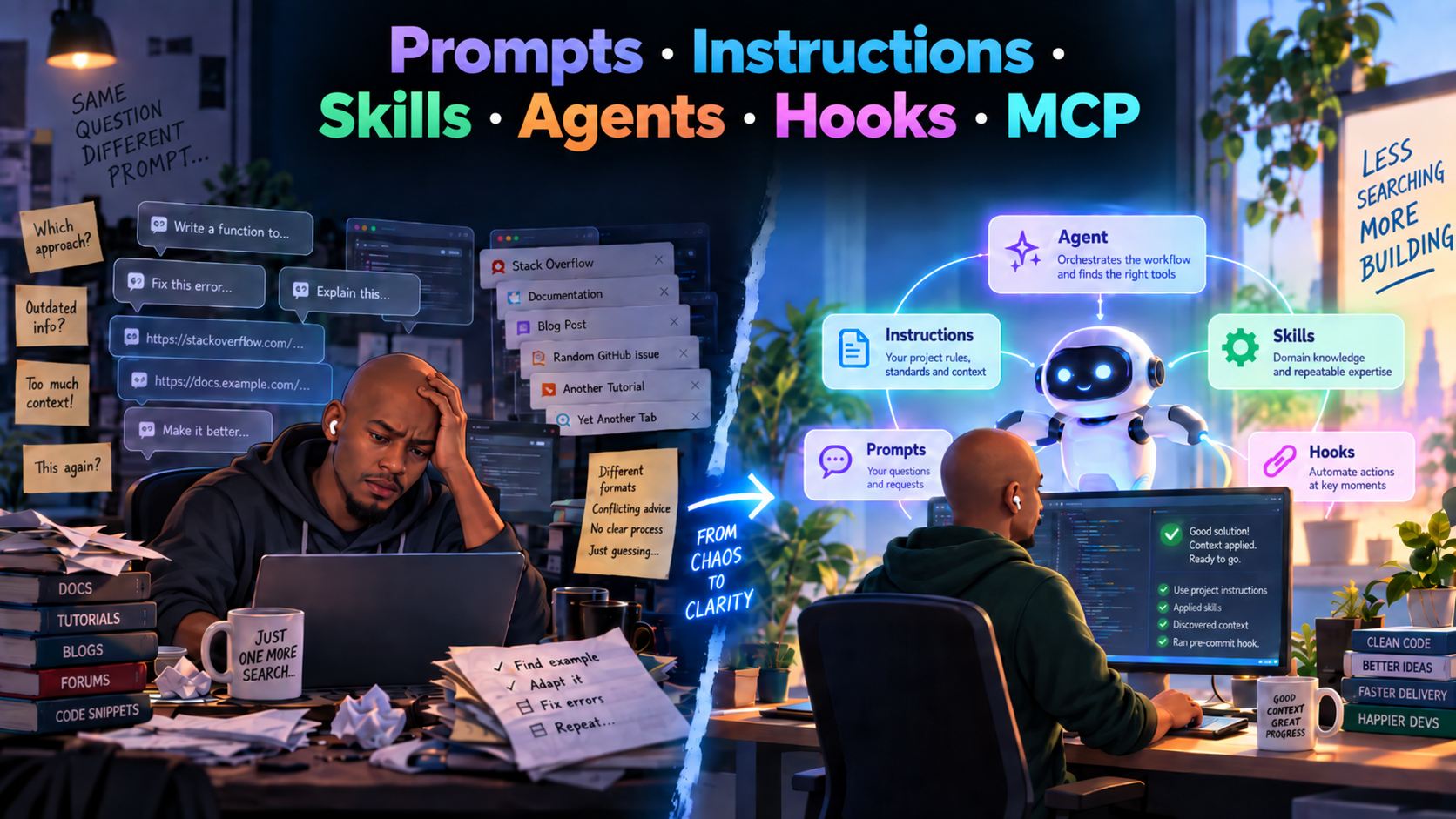
It’s Tuesday morning, 09:00.
You’re fired up, coffee nearby, and ready to build software.
You open GitHub Copilot and ask it to help implement a change.
Before it can really get going, you explain how the application is structured.
You tell it where the business logic belongs, which patterns the team follows, how tests should be written and which architectural boundaries it needs to respect.
Copilot gets to work.
The result is good.
Later that morning, you open another conversation to work on something else.
- Again, you explain the project structure.
- Again, you mention the coding standards.
- Again, you remind it how your team expects tests to be written.
- Again, you remind it which architectural boundaries it needs to respect.
At some point, you realise the problem. You are spending a surprising amount of time teaching Copilot how your engineering environment works before asking it to do any actual engineering.
- Some rules should already be available.
- Some expertise should be reusable.
- Some work should have a clear owner.
- Some behaviour should happen automatically.
- Some workflows need access to systems outside Copilot.
And that is where prompting starts to feel insufficient.
That is where GitHub Copilot customisation starts to become genuinely useful.
A simple way to think about Copilot customisation
The easiest way to understand the different features is not to start with their implementation.
Start with the responsibility each one owns.
- Prompt = intent — what do I want done right now?
- Instructions = constraints — what rules should consistently apply?
- Skill = expertise — how should this kind of work be done?
- Agent = responsibility — who owns this workflow or role?
- Hook = automation — what should happen automatically at a defined moment?
- MCP = external capability — what systems, tools, or data does the workflow need access to?
That distinction matters because these features are not interchangeable.
A prompt should not become a dumping ground for every project rule.
An instruction should not try to describe an entire workflow.
A skill should not become a disguised agent.
And an agent should not exist simply because a prompt became long.
The real design question is:
What is the responsibility, and where does that responsibility belong?
Quick decision framework
Use the smallest mechanism that solves the problem.
- If the guidance is one-off and task-specific, use a prompt.
- If it should apply repeatedly without being restated, use instructions.
- If it represents reusable specialist expertise, use a skill.
- If a worker owns a role or workflow, use an agent.
- If something should happen automatically at an event or boundary, use a hook.
- If the workflow needs access to an external system, use MCP.
Prompts: What do I want done right now?
A prompt expresses immediate intent.
It tells Copilot what you want to accomplish in the current interaction: review something, explain something, generate something, investigate a problem, or help make a decision.
The important distinction is that a prompt represents the request, not all of the knowledge, rules, or expertise needed to complete it.
What problem do prompts solve?
AI needs direction.
Even though relevant context is already available, Copilot still needs to understand the outcome you are trying to achieve.
A prompt provides that immediate goal.
The problem starts when the prompt also has to carry every coding standard, architectural rule, testing convention, workflow step, and piece of specialist knowledge required to complete the task.
That is usually a sign that some of those responsibilities belong elsewhere.
When should you use prompts?
Prompts work best for tasks you intentionally invoke rather than behaviour that should always apply.
Typical prompt tasks include:
- Generating unit tests according to a standard structure.
- Creating an implementation plan.
- Reviewing an API for security concerns.
- Generating documentation.
When should you NOT use prompts?
If something should apply all the time, it probably belongs in instructions, not a prompt.
For example:
Use xUnit for all .NET unit tests.
That's a repository convention. You shouldn't have to remember to restate it in every prompt.
Common mistakes
Prompts become bloated when they start carrying information that should already exist elsewhere. If you repeatedly paste the same coding conventions, architecture rules, or testing expectations into requests, the problem is probably missing instructions rather than weak prompting.
Another mistake is turning a prompt into an agent simply because the prompt has become long.
Instructions: Always apply these rules
What are instructions?
Instructions provide persistent guidance and constraints that should influence how work is carried out.
Unlike a prompt, which expresses what you want done now, instructions describe expectations that should remain true across multiple tasks.
They represent the standing rules of the environment.
What problem do instructions solve?
Without instructions, the same expectations have to be repeatedly communicated.
Developers end up restating things such as architectural boundaries, testing expectations, naming conventions, security requirements, and preferred patterns every time they start a new task.
Instructions separate those persistent constraints from the immediate request.
The prompt can then focus on what needs to be done, while the instructions provide the boundaries within which it should be done.
When should you use instructions?
Instructions make sense when the guidance should follow the work without the developer having to remember to provide it.
This keeps the context stable and makes the rules easier to apply consistently across work.
Instructions are a good fit for:
- Naming or coding conventions.
- Testing frameworks and testing expectations.
- Patterns the team uses or avoids.
- Repository architecture and important boundaries.
- Language/framework conventions.
When should you NOT use instructions?
- You only need a task or operation once.
- The behaviour is a multi-step workflow that needs orchestration rather than persistent guidance.
- The task requires specialised tooling or context that should not be treated as a universal rule.
Common mistakes
Instruction scope is often too broad. Guidance should apply only where it is relevant; otherwise unrelated work receives unnecessary constraints.
Vague principles are another problem: instructions should express actionable constraints.
- ✅ Effective
- ⚠️ Ineffective
Do not log authentication tokens.
New HTTP integrations must use the existing typed HttpClient pattern.
Use xUnit for new unit tests.
Write high-quality code.
Make sure the code is secure.
Follow best practices.
Instructions guide behaviour; they do not enforce it. If a rule must be guaranteed, it needs an enforcement mechanism rather than relying on AI behaviour alone.
Skills: How should this kind of work be done?
What are skills?
A skill packages reusable expertise for a particular kind of work.
It captures a recognisable method, body of knowledge, or approach that can be applied whenever the same type of problem appears.
A skill does not own the overall workflow. It contributes specialised capability to whoever is performing the work.
What problem do skills solve?
Many engineering tasks require more than general reasoning.
Reviewing requirements for completeness, assessing architecture impact, evaluating test adequacy, or analysing migration risk each requires a different way of thinking.
Without reusable skills, that expertise has to be reconstructed every time the task appears.
Skills allow that expertise to be separated from the immediate request and reused where appropriate.
When should you use skills?
A good skill has a recognisable boundary: it performs a particular kind of specialist work that will be useful more than once.
The best candidates tend to be specialised, reusable capabilities.
Good skill boundaries include:
- Requirements completeness assessment.
- Test adequacy assessment.
- Architecture impact analysis.
- Backward-compatibility analysis.
- Migration-risk analysis.
When should you NOT use skills?
A skill is not necessary when:
- The task is trivial.
- It is only needed once.
- The capability cannot be defined clearly enough to produce consistent results.
Common mistakes
Repetition alone does not justify a skill. A task should also represent reusable expertise with a meaningful boundary.
Skills tend to break down at either extreme: too broad to provide specialist guidance, or so narrow that they only apply to one ticket or edge case. Another warning sign is when a skill starts coordinating an entire workflow rather than contributing expertise to it.
Agents: Who owns this responsibility?
What are agents?
An agent represents a responsibility boundary.
It is useful when a piece of work benefits from having a distinct goal, role, context, or workflow ownership.
Instead of asking one general worker to plan, implement, review, test, and validate everything at once, different responsibilities can be separated.
A skill knows how to do something. An agent is responsible for getting something done.
What problem do agents solve?
Agents help prevent unrelated responsibilities from becoming mixed together.
When one worker is simultaneously expected to act as planner, developer, reviewer, tester, and architect, the boundaries between those responsibilities become unclear.
Separating those roles can make the purpose, context, and expected outcome of each stage easier to reason about.
The value of an agent therefore comes from the responsibility it owns, not from simply giving it a name or persona.
When should you use agents?
Create an agent when the work deserves its own responsibility boundary — for example, planning, reviewing, migration, or implementation.
Good agent responsibilities include:
- Analysing whether requirements are ready for implementation.
- Turning approved requirements into an implementation plan.
- Implementing a defined change.
- Reviewing a pull request and producing findings.
- Coordinating a bounded migration workflow.
When should you NOT use agents?
A dedicated agent is usually unnecessary when:
- You need reusable expertise. That's probably a skill.
- You are simply repeating the same request. That's probably a prompt.
- A rule should apply everywhere. Those belong in instructions.
- The existing worker already has sufficient responsibility and context for the task.
Common mistakes
A long prompt is not, by itself, a reason to create an agent. The agent should introduce a meaningful responsibility, context, toolset, or workflow boundary.
Another mistake is creating too many agents for responsibilities that do not need to be separated. Every additional boundary introduces coordination and context handoff, so the separation should earn its complexity.
Hooks: What should happen automatically when an event occurs?
What are hooks?
A hook connects a defined event to an automatic action.
The important idea is the relationship:
When this event occurs, perform this action.
What problem do hooks solve?
Some workflow behaviour should be reliable rather than optional. Checks, logging, validation, notifications and other mechanical actions can easily be forgotten when they depend on someone remembering to request them.
Hooks move that responsibility out of the conversation and into the workflow itself.
When should you use hooks?
Hooks earn their place when an action should happen because an event occurred, not because someone remembered to request it.
Common automated actions include:
- Validation.
- Auditing.
- Logging.
- Pre/post-task checks.
When should you NOT use hooks?
Avoid hooks when the action is optional or requires judgement.
Common mistakes
Hooks become dangerous when they automate something that has not been designed clearly in the first place. Automation should make a well-understood workflow reliable, not hide ambiguity inside it.
Another mistake is using hooks for decisions that require judgement. Hooks work best for predictable actions; if the correct response depends on context or interpretation, that responsibility probably belongs elsewhere.
MCP: What external capability does the workflow need?
What is MCP?
MCP provides a way for an AI workflow to reach beyond the information and capabilities already available in its immediate context.
It creates a boundary between the reasoning system and external tools, systems, or sources of information.
The important distinction is that MCP does not describe how to perform the work.
It provides access to something the work needs.
What problem does MCP solve?
Useful context and capabilities often live outside the AI system.
A workflow might need to retrieve requirements, query another system, inspect operational data, look up records, or perform an action through an external service.
For example, a requirements analyst agent may need information from a GitHub issue.
Without MCP, the agent may have to rely on a human to copy that context into the conversation manually.
For repeated workflows, manually copying that context into chat becomes inefficient and error-prone.
So instead of:
Human → copy user story → paste into Copilot
you can move toward:
Agent → MCP → GitHub
When should you use MCP?
MCP becomes relevant when the workflow reaches beyond the context Copilot already has — into another system, data source, or tool.
Common external capabilities include:
- Retrieving requirements from an issue or work-item system.
- Reading pull request or repository information.
- Querying operational or monitoring data.
- Looking up records in an external system.
- Creating or updating information in another service.
When should you NOT use MCP?
- When built-in capabilities already solve the work.
- When the information is project guidance or reusable methodology that can live in instructions, repository context, or a skill.
Common mistakes
External capability should be bounded. Give a workflow only the access it genuinely needs to fulfil its responsibility. This keeps access aligned with the boundary of the work.
Another mistake is introducing external access when the required information or capability is already available locally.
How it all fits together
Imagine we are running an Italian restaurant.
A customer places an order:
“Make me a Margherita pizza.”
That order is the equivalent of a prompt.
It tells us what needs to be done right now. The customer does not need to explain how the entire restaurant operates. They simply provide the immediate request.
But the chef should not make the pizza however they want.
The restaurant already has a set of standing rules:
- Use fresh ingredients.
- Keep preparation time under 30 minutes.
- Follow the restaurant's food-safety standards.
- Use approved ingredients and suppliers.
These are the equivalent of instructions.
They do not explain how to make one particular dish. They define the rules and constraints under which the kitchen operates.
The recipe is the skill
Now we need the actual know-how for preparing the pizza.
The Margherita recipe describes how to prepare the dough, add the ingredients, bake the pizza and finish the dish.
The restaurant may also have a separate Carbonara recipe with a different preparation method.
These recipes are the equivalent of skills.
Each skill packages reusable expertise for a particular kind of task.
The kitchen does not need to relearn how to make a Margherita or Carbonara every time someone orders one.
The chef is the agent
The agent is the chef.
The chef receives the order, works within the restaurant's standing rules, selects the appropriate recipe and performs the work.
A recipe knows how a dish should be made.
The chef owns the responsibility for getting it made.
But recipes alone are not enough. Some capabilities exist outside the chef's environment.
Hooks are the kitchen's automatic actions
Imagine that when an order is marked ready, the front-of-house team is automatically notified and the order status is updated.
That is the equivalent of a hook.
Nobody has to remember to request the action. It happens because a defined event occurred.
The hook is not the order, the rule, or the recipe. It connects an event to an automatic action.
MCP connects the kitchen to the outside world
Now imagine the chef discovers that the kitchen needs information from somewhere else.
They may need to check ingredient stock, look up a customer's allergy information, or place an order with an approved supplier.
Those external capabilities are not skills.
Knowing how to make a pizza does not give the chef access to an inventory or supplier system.
For our restaurant, imagine we have:
Inventory MCP server Allows the chef to:
- Check ingredient stock.
- Find ingredient locations.
- Update stock levels.
Supplier MCP server Allows the chef to:
- Find approved suppliers.
- Check ingredient availability.
- Place an ingredient order.
Putting the pieces together
A customer says:
“Make me a Margherita pizza.”
The chef receives the prompt, follows the restaurant's instructions, applies the Margherita pizza skill.
Defined hooks can automatically perform actions when particular events occur.
The chef checks the inventory system through an MCP server and discovers that fresh mozzarella is available.
The chef then prepares the pizza.
The agent coordinates all of this.
A recipe cannot check the stockroom. A stock-management system does not know how to make a pizza. Restaurant rules do not tell the chef what the customer ordered. And the customer's order does not need to contain the entire recipe.
Each piece has its own responsibility.
The strength of the system comes from combining them rather than trying to force everything into one giant prompt.
Final takeaway
The goal of Copilot customisation is not to use more features. It is to design better boundaries.
The important question is not simply:
"What feature should I use?"
Instead, ask:
"What is its scope?"
"Who owns the responsibility?"
"Where does it belong?"
Once those boundaries are clear, the customisation features stop looking like a collection of overlapping options.
They start looking like parts of a system.
Prompts express intent. Instructions define constraints. Skills package expertise. Agents own responsibility. Hooks automate events. MCP provides external capability.
And that is where GitHub Copilot customisation becomes much more useful.